
What Is Application Patching?
Application patching is the process of updating software to fix known vulnerabilities, improve stability and maintain compatibility. Most patches are released by vendors after they discover a weakness in their product, often in response to real-world attacks.
These fixes are critical because once a vulnerability becomes public, cyber criminals quickly develop automated tools that scan the internet for systems that haven't been patched yet.
Common applications that require regular patching include:
- Browsers such as Chrome, Edge and Firefox
- Adobe tools and PDF readers
- Office productivity suites
- Remote access tools
- Cloud and desktop applications used across the business
Patching makes sure your business isn't running outdated, unprotected versions that attackers can easily exploit.
Why Patching Matters

Unpatched applications are one of the most common causes of modern cyber incidents. Attackers know that many businesses delay updates, and they take advantage of that window to install malware, hijack accounts or extract data.
Strong patching practices reduce this risk significantly. Key benefits include:
- Blocking known vulnerabilities: Most cyber attacks target issues that have already been fixed by vendors. Patching takes advantage of those fixes before an attacker does.
- Reducing exposure from internet-facing applications: Browsers and plug-ins are constantly targeted because they interact directly with online content. Updates close off high-risk pathways.
- Preventing the spread of malware: Many attacks begin with a small foothold gained through a vulnerable application. Patching stops attackers from using those weaknesses to move further into your systems.
- Improving system stability: Updates often include performance improvements and bug fixes, helping applications run more smoothly for your team.
- Meeting Essential 8 and insurance expectations: Patching is a core requirement in the Essential 8 and is increasingly reviewed during cyber insurance assessments.
When patching is consistent and timely, it becomes one of the most effective layers in your cyber defence.
Where Application Patching Fits in the Essential 8
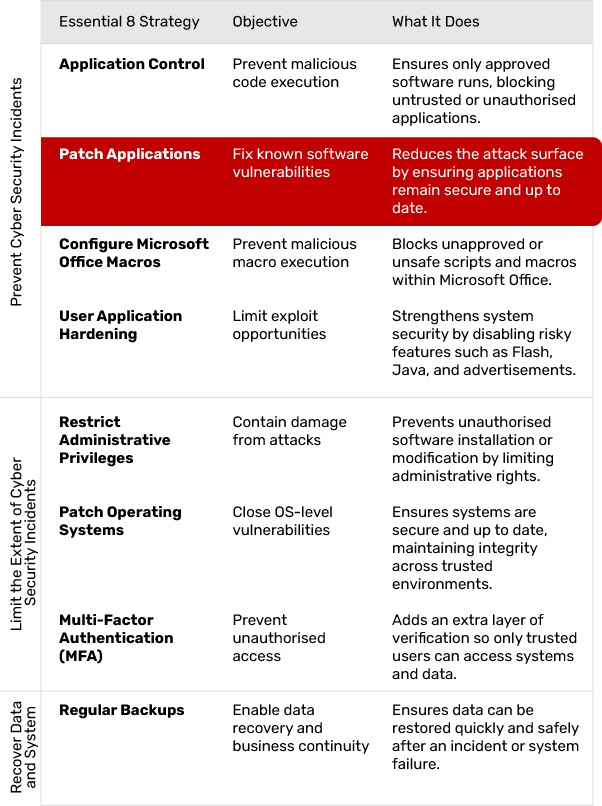
Patching Applications is part of the "Prevent Malware Delivery and Execution" group within the Essential 8. It works alongside Application Control, Macro Settings and Application Hardening to stop malicious code long before it reaches your systems.
It also supports controls in the second category by reducing the number of ways attackers can infiltrate accounts or escalate privileges.
What Effective Application Patching Looks Like
A strong patching approach is reliable, predictable and suited to the way the business operates. Effective patching typically includes:
- Regular scanning for missing updates: Tools should routinely check every device and application for known vulnerabilities, outdated versions and failed patches, giving IT full visibility into what needs attention.
- Automatic patch deployment: Updates should be pushed out across the environment without relying on manual intervention, ensuring critical fixes are applied quickly and reducing the risk of human error.
- Scheduled maintenance windows: Updates should be timed to install outside peak working hours, preventing disruptions and ensuring staff aren't impacted by system restarts or temporary downtime.
- Clear prioritisation rules: High-severity security patches should be applied immediately, while non-critical updates can follow a controlled rollout plan based on risk and operational needs.
- Coverage across cloud and desktop applications: Patching processes must include browsers, plug-ins, cloud platforms, business apps and local software, ensuring consistent protection beyond just servers.
- Accurate documentation and reporting: Update activity should be logged, monitored and reviewed regularly so the business knows what was patched, when it occurred and whether any devices still require attention.
Patching shouldn't be a "set and forget" task. It works best as a continuous process that strengthens system stability while reducing exposure to known threats.
Common Challenges (and How to Overcome Them)
Balancing Updates with Productivity
Interruptions during work hours can frustrate staff. Using automated patching tools that apply updates overnight or during off-peak windows helps keep the process invisible to the team.
Managing Multiple Applications
Different applications update at different times. Centralised patch management platforms consolidate these updates, making it easier to track which systems are compliant.
Legacy Software
Older tools may no longer receive vendor patches. These applications should be upgraded where possible or isolated from critical systems to reduce the risk of exploitation.
Cloud Application Blind Spots
Many businesses assume cloud apps are updated automatically. While vendors handle the backend, your organisation is still responsible for user settings, integrations and add-ons that may also require patching.
Ensuring Updates Have Actually Succeeded
Failed patches are common, especially on older devices. Monitoring and reporting tools provide visibility so issues can be fixed quickly rather than going unnoticed.
Implementation in Practice: A Step-by-Step Approach
Step 1: Identify All Applications in Use
Create a list of every application used across the business, including cloud tools, desktop programs and browser extensions.
Step 2: Assess Risk and Prioritise
Highlight applications that handle sensitive information, interact with the internet or are commonly targeted by attackers.
Step 3: Enable Automatic Updates Where Possible
Many modern applications support auto-patching. Turn this on to reduce manual workload.
Step 4: Use a Central Patch Management System
Tools like Microsoft Intune, RMM platforms or vendor-specific patching tools help apply and track updates consistently across all devices.
Step 5: Test Critical Patches
Before deploying high-impact updates across the business, test them on a small group of devices to ensure they don't disrupt essential workflows.
Step 6: Apply Updates Promptly
Security patches should be installed as soon as possible, especially those flagged as high severity.
Step 7: Monitor and Document
Track update results, fix any failures and maintain records for compliance and insurance reviews.
How Jam Cyber Helps
Jam Cyber helps Australian businesses stay ahead of vulnerabilities by managing patching end-to-end as part of a broader security framework. Our team monitors new security releases, applies patches safely and ensures every device and application stays compliant.
Application patching integrates seamlessly with our wider services:
- Cyber Security: Strengthens your defence layers and reduces exploit risk
- Managed IT: Ensures updates are deployed reliably and tested before rollout
- Cyber Guard: Provides continuous monitoring, reporting and alerting
- Consultation: Supports governance, patching policies and compliance reviews
What Success Looks Like
When patching is consistent and automated, vulnerabilities are closed before attackers can take advantage of them. Systems run more smoothly, downtime is reduced, and the business can operate with confidence knowing it's protected against known threats. Security audits become easier, insurance requirements are met, and the business stays resilient even as new vulnerabilities emerge.
Next Steps
If application patching hasn't been reviewed recently, now is the ideal time. Look at which software your team relies on most and whether updates are being applied quickly and consistently.
Jam Cyber can help your business automate patching, strengthen security and bring your systems in line with the ACSC Essential 8. Contact our team today.
Close the gaps before attackers find them.
Jam Cyber manages application patching end-to-end as part of our Managed IT and Cyber Security services.
Book a Free Strategy Session