What Is Patch Operating Systems?
Patching operating systems means applying vendor updates that specifically target weaknesses or errors within the core software that runs your computers and servers. These updates are released regularly to fix security vulnerabilities, improve functionality, and maintain compatibility with modern applications. When these patches are applied promptly, they strengthen your system and make it much harder for attackers to gain access.
Think of patching like fixing a leak in your roof. If you leave it unattended, the next storm will cause damage that could have been easily prevented. The same logic applies to your IT systems. Regular operating system updates are a simple but powerful way to prevent major security and performance issues before they happen.
Why It Matters: The Risk of Not Patching

Running outdated operating systems leaves your business open to risk. Attackers specifically look for known weaknesses in old software, using automated tools to find and exploit them. Once a single unpatched device is breached, the issue can quickly spread across your network, affecting servers, endpoints, and even connected applications.
Outdated operating systems can also cause day-to-day issues that go beyond cyber threats. They often struggle with performance, fail to integrate with newer applications, and no longer receive vendor support, leaving your team exposed to both security and operational problems.
- Higher risk of attack: Unpatched systems are easy for attackers to exploit because the vulnerabilities are publicly documented.
- Data loss and downtime: Attacks like WannaCry spread rapidly through unpatched operating systems, shutting down businesses worldwide.
- Compliance and privacy risks: Unsupported operating systems may breach ISO 27001 and Privacy Act obligations.
- Loss of client confidence: A breach caused by an outdated system can erode trust and damage your professional reputation.
According to the ACSC, applying patches for high-risk vulnerabilities within 48 hours significantly lowers the chance of compromise. For most businesses, that small window makes all the difference between a contained issue and a full-scale incident.
Part of the ACSC Essential 8
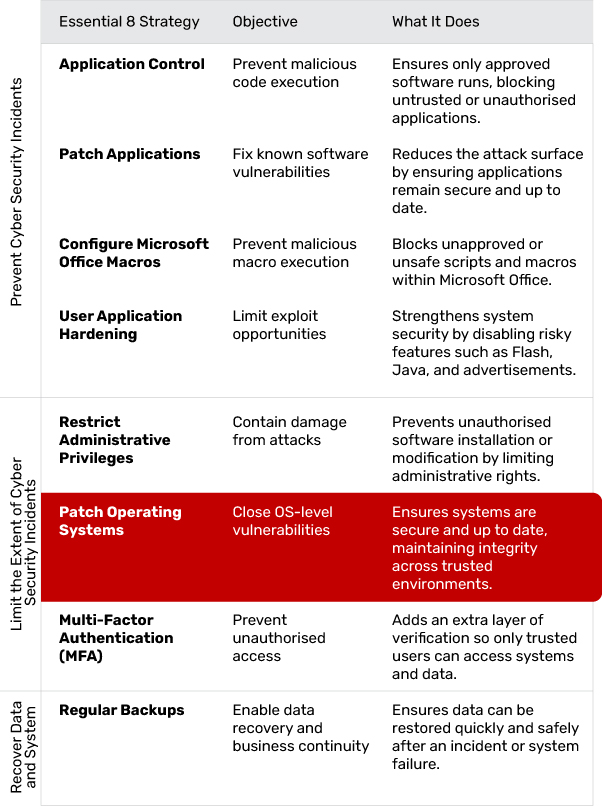
The Essential 8 framework is built on three core objectives: prevent, limit, and recover. Patch Operating Systems sits within the limit category. It protects your business by closing vulnerabilities in the software that runs your computers and servers, ensuring that malicious code cannot take advantage of known weaknesses.
What Effective Application Patching Looks Like
A strong patching approach is reliable, predictable and suited to the way the business operates. Effective patching typically includes:
- Regular scanning for missing updates: Tools should routinely check every device and application for known vulnerabilities, outdated versions and failed patches, giving IT full visibility into what needs attention.
- Automatic patch deployment: Updates should be pushed out across the environment without relying on manual intervention, ensuring critical fixes are applied quickly and reducing the risk of human error.
- Scheduled maintenance windows: Updates should be timed to install outside peak working hours, preventing disruptions and ensuring staff aren't impacted by system restarts or temporary downtime.
- Clear prioritisation rules: High-severity security patches should be applied immediately, while non-critical updates can follow a controlled rollout plan based on risk and operational needs.
- Coverage across cloud and desktop applications: Patching processes must include browsers, plug-ins, cloud platforms, business apps and local software, ensuring consistent protection beyond just servers.
- Accurate documentation and reporting: Update activity should be logged, monitored and reviewed regularly so the business knows what was patched, when it occurred and whether any devices still require attention.
Patching shouldn't be a "set and forget" task. It works best as a continuous process that strengthens system stability while reducing exposure to known threats.
Common Patch Operating System Challenges (and How to Overcome Them)
Even though patching operating systems is a straightforward concept, businesses often run into practical difficulties when managing updates across multiple devices and environments.
Update Scheduling and Downtime
Installing patches can disrupt normal operations if updates are pushed during business hours. To minimise downtime, schedule installations after hours or during low-activity periods. Stagger rollouts where possible to avoid interrupting entire teams at once.
Legacy or Unsupported Systems
Older systems often cannot receive new patches, leaving them vulnerable. Identify these devices early and create a plan to replace, isolate, or virtualise them to reduce exposure.
Lack of Visibility and Tracking
Without central monitoring, it is hard to know which systems are patched and which are not. Implement a managed patching solution that tracks update status and generates regular compliance reports.
Unclear Responsibilities
When patching falls between IT, operations, or external providers, updates can be missed. Define ownership in your security policy and ensure regular accountability checks.
Testing and Compatibility Issues
Some updates can conflict with business applications. Test new patches in a small group before full deployment to verify stability and reduce the risk of disruption.
By anticipating these challenges and addressing them early, businesses can make patch management routine and effective rather than reactive.
Implementation in Practice: A Step-by-Step Approach

Step 1: Identify Critical Systems
Start by mapping out all servers, computers, and network devices that rely on your operating systems. Prioritise systems that store or process sensitive data and those that, if compromised, would cause the most disruption.
Step 2: Check Current Patch Status
Use discovery tools to identify which systems are missing patches. Record the operating system version, patch level, and vendor support status to create a reliable baseline.
Step 3: Create a Patch Schedule
Define a clear update schedule that includes critical patches within 48 hours and routine patches at regular intervals. This reduces the risk of leaving known vulnerabilities unaddressed.
Step 4: Test Before You Deploy
Run updates on a small number of test machines to confirm compatibility with your key applications. This avoids business interruptions and ensures stability once deployed more widely.
Step 5: Automate the Process
Where possible, automate patching through a central management system. Automated patching ensures updates happen consistently across all devices and reduces the chance of human error.
Step 6: Monitor and Report
After deployment, confirm patches were applied correctly. Generate reports showing compliance, success rates, and any failed installations that need follow-up.
Step 7: Maintain and Improve
Review your patching process regularly. Remove unsupported systems, document lessons learned, and adjust schedules or procedures as needed.
How Jam Cyber Helps
Jam Cyber makes operating system patching simple and reliable. We automate updates, test patches before deployment, and provide clear reports so you always know your systems are up to date.
Our service includes:
- Cyber Security: We protect your business with proactive monitoring, threat detection, and incident response measures designed for professional service firms.
- Managed IT: Our team keeps your technology running smoothly, ensuring that updates and maintenance occur seamlessly in the background.
- Cyber Guard: We provide round-the-clock system monitoring and alerting so vulnerabilities are identified and addressed before they become threats.
- Consultation: Our experts help you plan, implement, and maintain a security strategy that fits your business goals and compliance requirements.
Patching Operating Systems is a core part of Jam Cyber's Cyber Security and Cyber Guard services. We ensure your systems remain up to date, secure, and continuously monitored, reducing vulnerabilities before they become risks.
What Success Looks Like
When patching is done well, it fades into the background — but its impact is huge:
- Reduced cyber attack risk
- Fewer performance issues
- Stronger compliance and reporting
- Greater trust from clients and stakeholders
In short: fewer surprises, fewer breaches.
Next Steps
If it's been more than a few weeks since your last system update, now's the time to act. Start by confirming every device is supported and patched.
Jam Cyber can help you automate the process and build patching into your ongoing cyber strategy. Get in touch with our team to keep your systems secure and your business running smoothly.
Keep your systems patched and protected.
Jam Cyber automates OS patching as part of our Managed IT and Cyber Guard services, so your business stays ahead of vulnerabilities.
Book a Free Strategy Session